
Text Bubbles & Annotations
Text annotations on your charts become analysis notes in your journal. TradeJour uses these notes to generate detailed trade summaries that help you review your logic later.
Note: Text annotations are optional but highly recommended for maintaining detailed trade analysis.
Why Use Text Annotations?
- Document your logic: Explain why you took the trade
- Trade summaries: TradeJour generates comprehensive trade summaries from your notes
- Pattern recognition: Review what setups work for you over time
- Learning tool: Compare your pre-trade analysis with actual outcome
How to Add Text Annotations in TradingView
- In TradingView, click the "Text" tool in the drawing toolbar (or press Alt+T)
- Click on your chart where you want to place the note
- Type your analysis or observation
- Repeat for multiple notes (key levels, patterns, etc.)
- Take your screenshot with the text visible
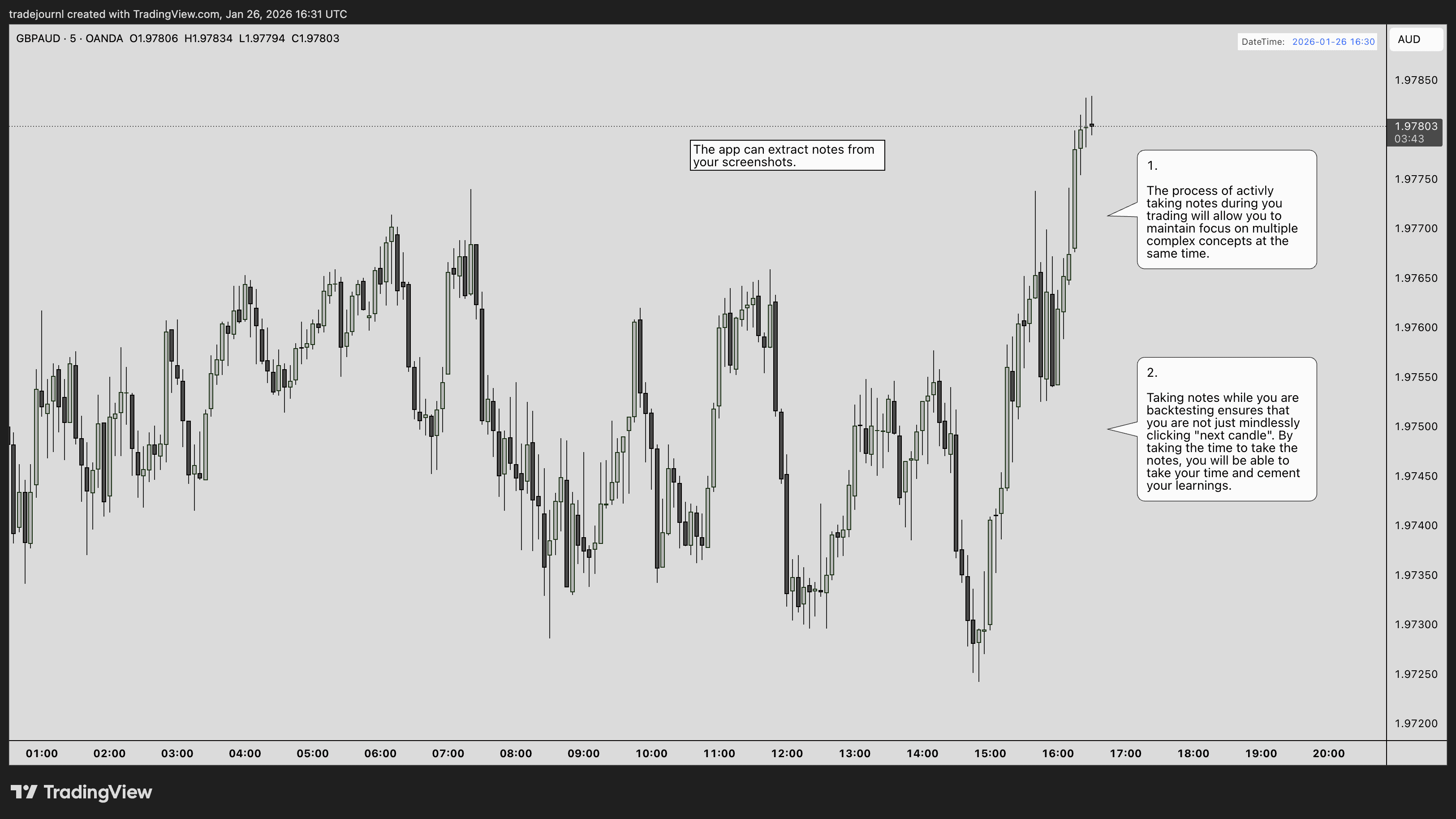
Example of text annotations on a TradingView chart - these notes become auto-generated trade summaries
How It Appears in Your Journal
After uploading the screenshot above, TradeJour extracts the text annotations and displays them in your journal entry. Here's what the extracted notes look like:
"The app can extract notes from your screenshots."
"The process of actively taking notes during you trading will allow you to later focus on multiple complex concepts at the same time."
"Taking notes while you are backtesting ensures that you cement certain learnings by clicking 'next candle'. By taking the time to take the notes, you will be able to take your time and cement your learnings."
💡 Tip: The more detailed your text annotations, the better the auto-generated summary will be. Your notes are preserved exactly as written, and TradeJour uses them to create insightful trade summaries.
What to Include in Your Notes
Trade Setup
- What pattern or setup triggered the trade?
- Example: "Double bottom at support", "Head and shoulders", "Bullish engulfing"
Key Levels
- Important support/resistance levels
- Example: "Strong support at 1.0850", "Daily resistance zone"
Indicators & Signals
- What indicators confirmed the trade?
- Example: "RSI divergence", "MACD crossover", "50 EMA bounce"
Market Context
- Broader trend or market conditions
- Example: "Uptrend on daily", "Consolidation range", "After NFP news"
Best Practices
- Be concise: Short phrases work better than long paragraphs
- Use clear language: Avoid abbreviations that may be misread
- Position clearly: Place text where it won't overlap with the PnL tool
- Contrasting colors: Use colors that stand out against your chart background
- Readable size: Make text large enough to be captured by OCR
How TradeJour Processes Text
- OCR extraction: Text is extracted from your screenshot
- Note consolidation: All text bubbles are combined into a notes field
- Trade summary: TradeJour.nl analyses your notes and generates a comprehensive trade summary
- Tag generation: Relevant tags are auto-generated based on your analysis
Example Annotations
Good Example:
"Bullish divergence on RSI" "Break of descending trendline" "Strong support at 1.0800" "Waiting for 4H close above resistance"
Less Effective:
"good trade!!!" "?" "notes here"
The first example provides specific, actionable details that create a valuable trade summary. The second example is too vague to be useful for review or analysis.
Tips
- Add notes BEFORE taking the screenshot (capture your pre-trade thinking)
- You can add post-trade analysis notes as a separate screenshot later
- Use consistent terminology for better pattern recognition across trades
- Don't worry about perfect grammar - focus on capturing the key points
Next Steps
Last updated: January 2026